





A sales lead is a person or company that has shown interest in what you sell, for example by filling in a form, downloading a guide or leaving a business card at a trade show, but hasn’t yet talked to you about buying. A lead is where a sale can start, not a sale.
Whether that lead becomes a customer depends largely on what your team does with it in the first hours. In this article you’ll learn:
- how a lead differs from a contact, a prospect, an opportunity and a customer,
- what types of leads there are (hot, warm, cold, MQL, SQL),
- what should happen to a lead from the moment it reaches your company,
- how to keep leads from going cold.
What is a sales lead?
A sales lead is a potential customer who has left their contact details and signaled that they might be interested in buying. In B2B sales, a lead is usually a specific person at a company, such as a department head, an owner or a specialist looking for a solution.
In business, you can call someone a lead only when two things come together:
- contact details, such as an email address, a phone number and a company name,
- a signal of interest, meaning an action that shows the topic matters to them.
An email address from a purchased list isn’t a lead yet. It’s a contact. It becomes a lead only when that person responds to your offer in some way.
A lead is the first stage of your sales process. How many leads turn into customers depends on what happens to them in the stages that follow.
How is a lead different from a contact, prospect, opportunity and customer?
Many companies use these words interchangeably, and that’s where most arguments between marketing and sales come from. Marketing reports 80 leads a month, while sales says there was “no one to talk to,” because each team counts something different.
| Term | What it means | What must happen to move on? | Who usually owns it? |
|---|---|---|---|
| Contact | A person’s or company’s details, with no signal of interest | A response to your offer or outreach | Marketing |
| Lead | A person who has shown interest and left their details | Qualification: do they fit your ideal customer and have a need? | Marketing or SDR |
| Prospect (qualified lead) | A lead that meets your agreed criteria | A conversation about a specific need, budget and timeline | SDR or account executive |
| Opportunity | A real chance to sell, with a defined need and value | Proposal, negotiation, decision | Account executive |
| Customer | A company that has bought | Onboarding, service, repeat purchases | Account executive or account manager |
The lines between these stages look a little different in every company. For one, a lead is anyone who downloaded an ebook. For another, it’s only someone who asked for a quote. There is no single correct definition. What matters is that marketing and sales understand it the same way and write it down in one place.
What types of sales leads are there?
Leads are usually grouped by three criteria: temperature, qualification stage and source.
What is the difference between hot, warm and cold leads?
- Cold lead: someone who has come across your company but shows no active interest right now. For example, they signed up for your newsletter and haven’t opened an email since.
- Warm lead: someone interested in the topic but not ready to talk about buying. For example, they attended your webinar and downloaded a checklist, but haven’t asked about your offer.
- Hot lead: someone ready to talk to a sales rep. For example, they filled in a “Request a quote” form or called with a specific question.
Temperature changes. A warm lead that nobody follows up with turns cold within a few weeks. A cold lead can warm up when a new need appears at their company, or in response to your outreach.
What are MQLs and SQLs?
- MQL (marketing qualified lead): a lead qualified by marketing. It fits your ideal customer profile and engages with your content (downloads materials, returns to your website, opens emails), but isn’t ready to talk about buying yet.
- SQL (sales qualified lead): a lead qualified by sales. A rep has confirmed there’s a need and it’s worth discussing your offer.
The simplest way to put it: an MQL is browsing, an SQL is asking about terms. The move from MQL to SQL is the moment a lead passes from marketing to sales, and that handoff is where leads most often get lost.
Where did the lead come from: inbound, outbound or referral?
- Inbound lead: reached out to you on their own, through a form, chat or phone call. Usually warmer, because they started the conversation.
- Outbound lead: your team reached them first, through a cold email, a call or a LinkedIn message. Starts cold.
- Referral lead: came from a customer or partner. Often turns into a sale fastest, because they already trust the person who referred them.
Purchased leads, meaning contact lists bought from third parties, are a separate category. Before you use them, check two things:
- how the data was collected and whether people on the list agreed to be contacted (GDPR applies if you sell to the EU),
- whether several other companies are contacting the same people at the same time.
Where do sales leads come from?
The most common sources of B2B sales leads are:
- a contact or quote request form on your website,
- inbound emails and phone calls,
- downloadable content (ebooks, reports, templates) and webinars,
- paid campaigns with a built-in form, such as LinkedIn Lead Gen Forms,
- LinkedIn and social selling,
- trade shows, conferences and industry events,
- referrals from customers and partners,
- outbound prospecting by your reps.
Each source brings leads of different temperature and quality. That’s why it pays to record where every lead came from. Without it, after a quarter you can’t tell which channel brings customers and which brings only contacts.
What happens to a lead after you capture it?
For many companies, capturing a lead is where marketing’s job ends and the campaign counts as a success. Yet a lead is only the entry point to your sales process. How many leads become customers depends on what happens next.
A well-handled lead goes through five steps:
- It’s logged in one place. The lead goes into your CRM, not into one rep’s inbox or a spreadsheet nobody opens.
- It gets an owner. From the first minute, everyone knows who is responsible for contacting this lead.
- First contact. A call or an email, ideally within a response time your team has agreed on (more on that below).
- Qualification. A rep or SDR checks whether there’s a need, budget, a decision maker and a timeline, usually during a discovery call.
- A decision on what’s next. The lead can:
- become an opportunity and move into your sales pipeline,
- go back to marketing for nurturing, if the need is real but not urgent,
- be disqualified, with the reason recorded.
Lead nurturing means staying in touch with someone who isn’t ready to buy yet. Usually that’s useful content, webinar invitations and occasional messages from the lead’s owner. It makes sense when you know the need will come, just not when.
Most leads are lost between steps 1 and 3. The lead is in the system, but nobody feels responsible for it.
How do you know if a lead is worth pursuing?
Not every lead deserves the same amount of a rep’s time. To keep your team from spending hours on contacts with no potential, you need qualification criteria. Most teams check:
- fit with your ideal customer profile: industry, company size, region and the person’s role,
- need: does the company have a problem your offer solves?
- budget: can they afford this kind of purchase?
- authority: are you talking to the person who decides, or who influences the decision?
- timeline: when do they want to solve the problem?
The last four points are the BANT framework (budget, authority, need, timeline), one of the most widely used ways to qualify leads in B2B sales.
When you have many leads, lead scoring helps. You assign points for a lead’s traits and behavior, such as their job title, visits to your pricing page or webinar attendance, and prioritize the highest scores.
Your company sets the criteria, not the tool. The ones that work best are written down by marketing and sales together and checked against data every quarter: do leads marked as good actually become customers more often?
Why does lead response time matter?
A lead loses temperature with every hour it waits. Someone who sends an inquiry has usually sent it to several companies. Whoever replies first has the best chance of a conversation, because the buyer isn’t yet tired of talking to competitors.
Research published in Harvard Business Review in March 2011 showed how wide the gap is. The authors sent a test inquiry through the websites of 2,241 US companies:
- 37% replied within an hour,
- 24% took more than 24 hours,
- 23% never replied at all,
- the average response time was 42 hours.
In a separate analysis of 1.25 million leads, companies that tried to reach a lead within an hour were nearly 7 times as likely to qualify it as those that waited one more hour, and more than 60 times as likely as those that waited a day or longer.
The study is more than a decade old, but the direction is clear, and fast response is easier to achieve today than it was then. A Mercedes-Benz dealership, Auto Partner Garcarek, cut its average lead response time to 5 minutes, 90% faster than before.
Minutes don’t matter in every type of sale. In complex deals that run for months, the quality of the first conversation can matter more than speed. What does matter everywhere is that your team:
- agrees on a response time for leads from each source,
- assigns specific people to meet it,
- measures whether it’s being met.
You can track it alongside other sales metrics, as one of the leading indicators that shows a problem before revenue does.
How do you manage leads in a CRM?
A spreadsheet or a shared inbox works when you get a few leads a month. With a few dozen, problems start: leads get duplicated, nobody knows who called whom, and when a rep goes on vacation, their contacts go quiet.
For every lead, record:
- the source (form, campaign, referral, trade show),
- the date it came in and the date of first contact,
- the need it came with,
- the owner,
- its stage in your sales process,
- the reason it was disqualified, if it didn’t move on.
That’s the core of what a CRM does for leads: one record, one owner, one history.
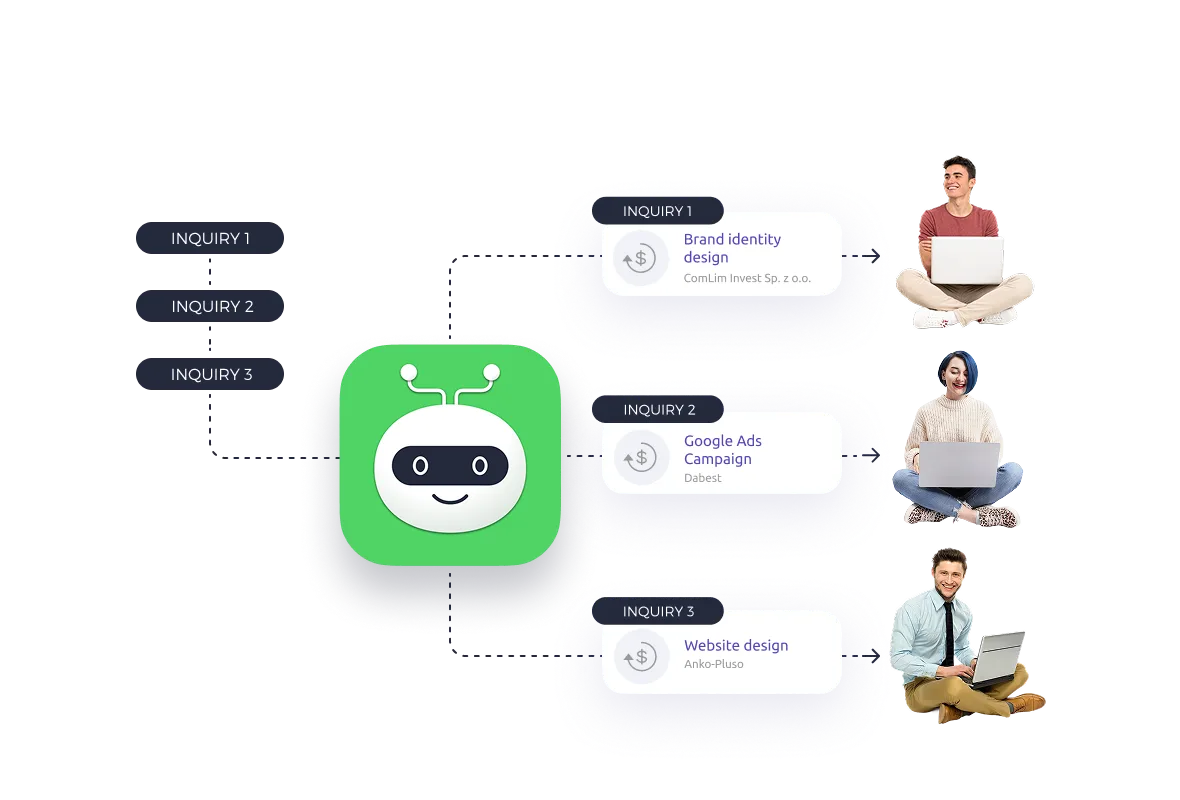
What does it look like in practice? In Livespace, a form on your website or a lead ad campaign can create a contact and a deal at the first stage of your sales process right away, through tools such as Make or Zapier. Sales Bot then assigns the deal to a rep based on rules you set and notifies them. Your team defines the stages and the criteria for moving between them, so “lead,” “qualified lead” and “opportunity” mean exactly what they mean in your company.
Automatic assignment shortens the path from inquiry to first call, but it won’t decide who calls back and how fast. You set that. The CRM helps you check whether your team keeps to it.
What mistakes cost you leads?
Most leads aren’t lost because of a weak offer. They’re lost because of how the work is organized. The most common mistakes:
- Leads sitting in reps’ inboxes. An inquiry goes to one person, and when they’re on vacation or change jobs, the lead disappears.
- No owner. The lead is in the system, but nobody is responsible for it, so everyone assumes someone else will handle it.
- Counting leads instead of customers. If marketing is measured on lead volume, it will deliver more leads, not necessarily better ones.
- No shared definition of a good lead. Marketing and sales judge quality by different criteria and argue instead of improving the process.
- One attempt and done. A rep calls once, nobody picks up, and the lead is dropped. Reaching someone often takes several follow-ups across different channels.
- Disqualifying without a reason. If you don’t record why a lead didn’t move on, you can’t tell what to fix: the campaign, the criteria or the offer.
If you recognize two or three of these, you don’t have to rebuild your whole sales operation. Start with one thing: decide who owns every new lead and how quickly they reach out.
Example: one lead’s path in a B2B company
An IT services company in Austin, Texas, runs a LinkedIn campaign with a “Request a quote” form. On Tuesday at 10:12 a.m., the operations manager of a logistics firm with 60 trucks fills it in.
- 10:12 – the lead lands in the CRM as a new deal, tagged with the source “LinkedIn – quote campaign.”
- 10:13 – the deal is assigned to the rep who covers transportation clients, and the rep gets a notification.
- 10:25 – the rep calls. The manager picks up, because they’re still at their desk.
- 10:40 – after a short call, it’s clear there’s a need (routes are still planned by hand), budget is set aside for next year, and the decision will be made with the CEO this quarter.
- 10:45 – the deal moves to the “Needs analysis” stage, and a demo with the CEO is on the calendar.
If the same lead had waited three days for a reply, the manager would most likely already be talking to two other vendors.
Frequently asked questions
What is a lead in business?
In business, a lead is a potential customer who has shown interest in your offer and left contact details. A lead isn’t a customer yet. It’s the first stage of your sales process, and it still needs to be qualified.
Is a lead the same as a customer?
No. A lead is a potential customer at the very start of the sales process. They become a customer only after buying, and on the way they usually go through qualification, conversations, a proposal and negotiation.
What is the difference between a lead and a prospect?
A lead has shown interest. A prospect is a lead you’ve checked against your criteria: it fits your ideal customer profile and has a real need. Some companies use the two words interchangeably, so agree on one definition inside your team.
What is the difference between a lead and an opportunity?
A lead is someone who has shown interest. An opportunity is a qualified lead with a confirmed need, and often a known budget, decision maker and timeline. With an opportunity, a rep is already working on a proposal.
What are the types of leads in sales?
Leads are usually grouped by:
- temperature: cold, warm and hot,
- qualification: MQL and SQL,
- source: inbound, outbound, referral and purchased.
What is a qualified lead?
A qualified lead meets the criteria your team agreed on, such as fit with your ideal customer profile, a real need, budget, a decision maker and a timeline. Frameworks such as BANT help you check these consistently.
How fast should you respond to a new lead?
As fast as you reliably can, especially for inbound leads, who often contact several vendors at once. In the 2011 Harvard Business Review study, companies that tried to reach a lead within an hour were nearly 7 times as likely to qualify it as those that waited an hour longer. What matters most is that your response time is agreed on and measured.
What is the difference between an MQL and an SQL?
An MQL (marketing qualified lead) fits your customer profile and engages with your content but hasn’t expressed a buying need. An SQL (sales qualified lead) is a lead a rep has confirmed is ready to talk about your offer.
Should you buy lead lists?
It can pay off, but it carries risk. Purchased leads are usually cold, the same list is often sold to several companies, and contacting people who haven’t agreed to it can break privacy laws such as GDPR. Before you buy, check how and when the data was collected.
Summary
A sales lead is a potential customer who has shown interest in your offer. It’s the entry point to your sales process, not its result. How many leads you keep depends on a few things you control directly:
- a shared definition of a lead for marketing and sales,
- one place where every lead lands,
- a clear owner for each lead,
- an agreed response time,
- qualification criteria and a recorded reason for every disqualified lead.
To start, check what happens to your leads in the first hour after they reach out: who gets them and when they’re called.
Want every lead from your website to reach the right rep within minutes? Try Livespace for free for 14 days and set up your own sales process and lead assignment rules.

Turn this into results
See Livespace on your own data, or try it yourself — no card, no commitment.