






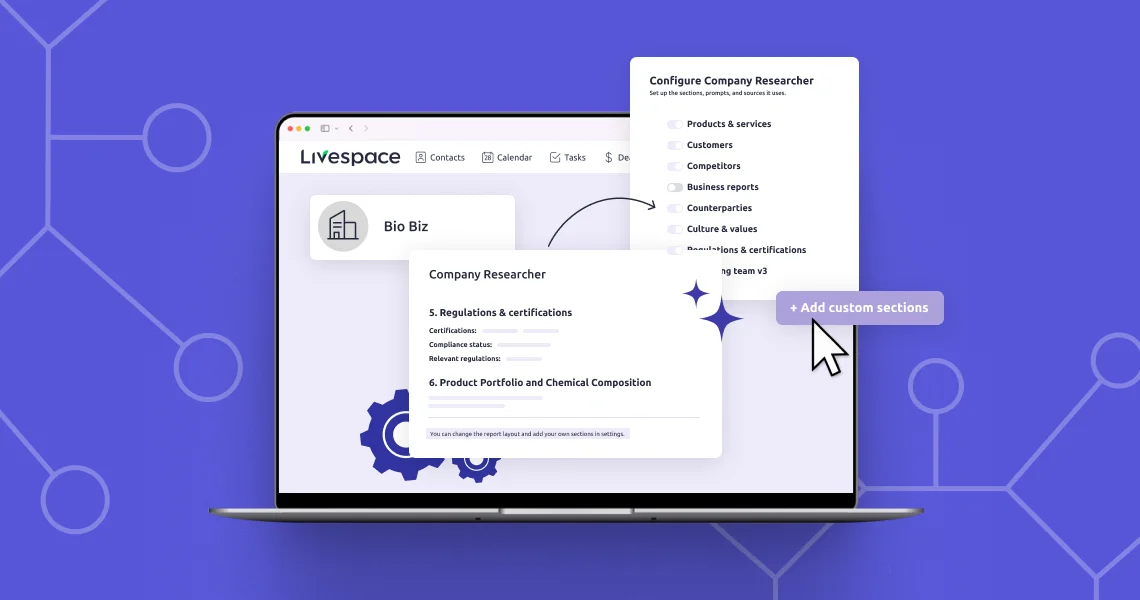
How much time do your reps spend preparing for a call? Even if you already use the Company Researcher in Livespace, by default you get a generic company overview. Custom sections solve that problem and fill the report with industry-specific details. And you can set them up quickly, for the whole company at once.
Built-in sections answer general questions
Built-in sections cover topics that describe any company in the world: company profile, products and services, customers, competitors, business signals. That’s a sensible starting point and good background for a call. What it rarely is, though, is something that gives the client the feeling that you’ve done your homework.
You can see this across three industries:
- Industrial chemicals: what matters is what the company actually has in its portfolio: which components and solvents it sells, their declared composition, and the CAS numbers of the main substances.
- SaaS: those questions don’t make sense, because what matters is the tech stack, team size, and the date of the last funding round.
- Financial services: you need to start with something else entirely: what regulatory oversight the company is subject to, what licenses it holds, and who on their side approves a purchase.
These are three different sets of questions, and no universal set of built-in sections can answer all of them at once. Save your reps’ time and add custom sections to the report, where you define the name and prompt yourself.
How custom sections work in the admin panel
You set them up in a few clicks on your account, and you don’t need to know anything about AI projects. You build the report out of blocks, and your team gets a ready-made result.
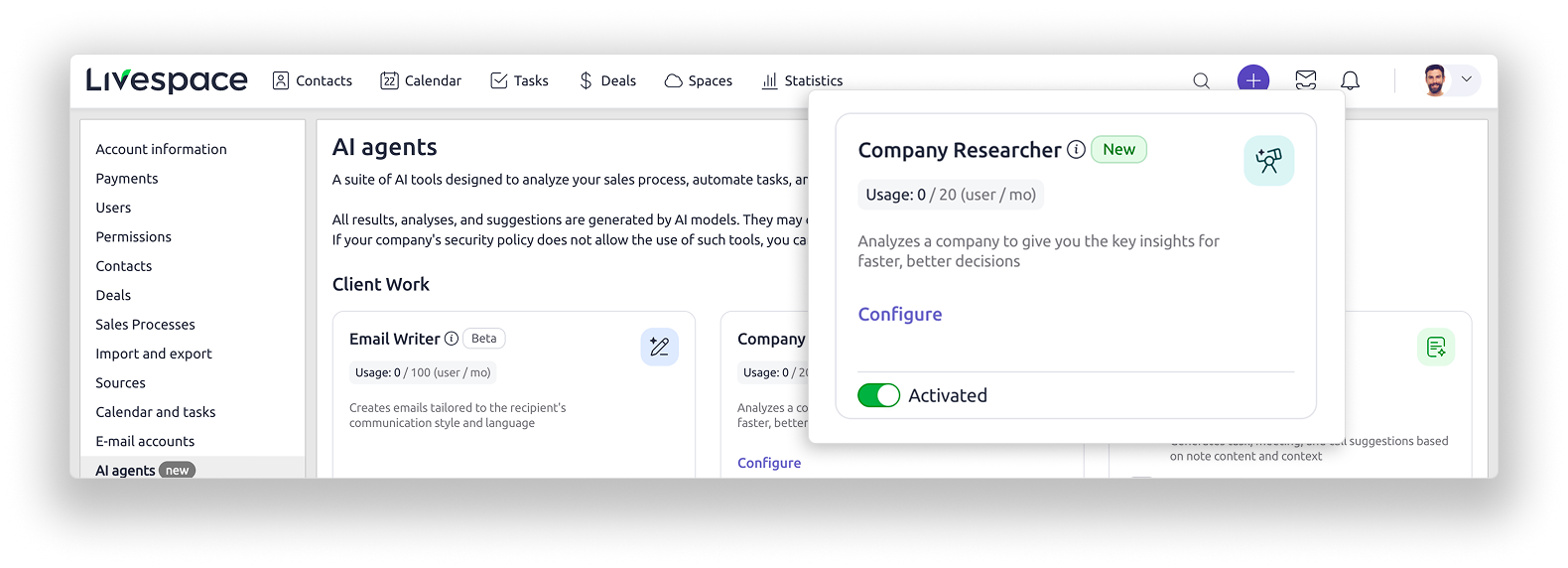
You’ll find the configuration in Account Settings, in the AI Agents section, on the Company Researcher tab. There you select which sections go into the analysis. You can choose from built-in sections, which you can only turn on or off, and custom sections, where you describe what your team needs.
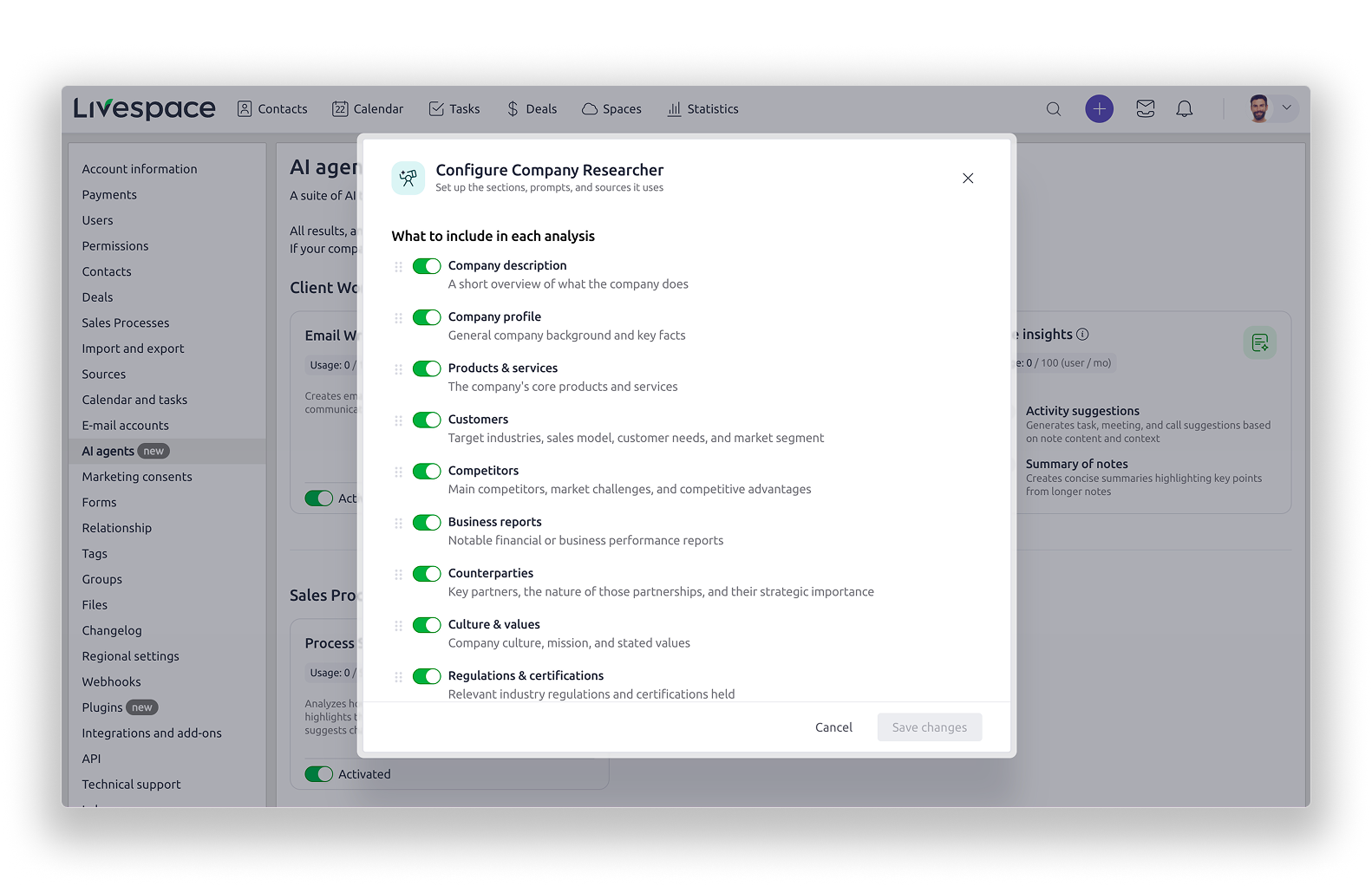
A custom section consists of a name (up to 100 characters) and a prompt (up to 2,000 characters, roughly 300 words). With room to spare, that’s enough for a solid briefing. The whole report can contain up to 10 sections.
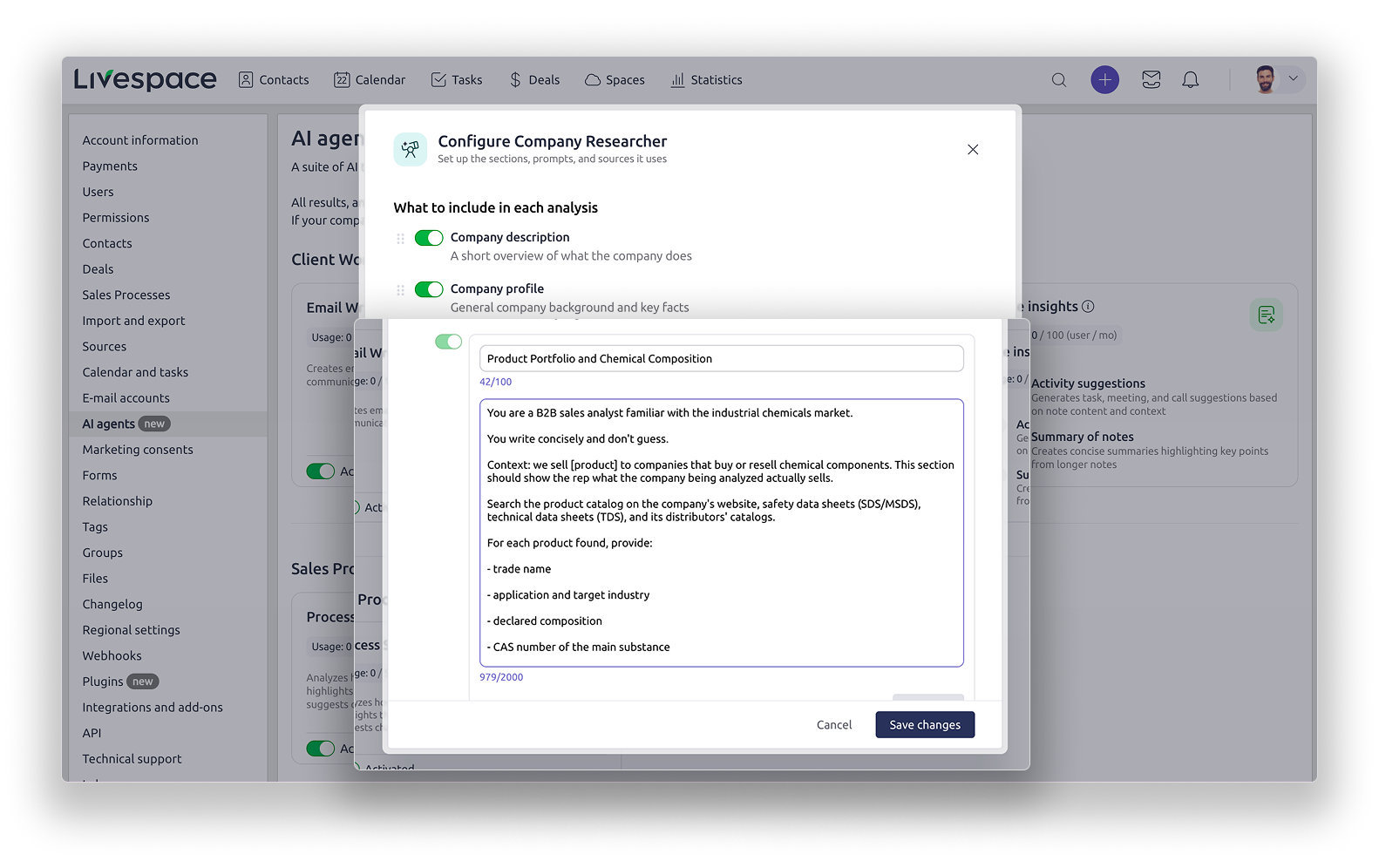
Built-in and custom sections also differ in search scope. Built-in sections search the entire internet, and that can’t be narrowed down. With a custom section, you can provide a list of allowed domains, i.e. point the agent to specific sources to use. This comes in handy when a reliable answer lives in a specific registry or industry directory.
These rules have four consequences that affect how you write prompts, and how effective they are, more than any wording trick:
- The configuration is shared across the whole instance. Prompts are written exclusively by the administrator, and the rep sees only the analysis result: they don’t select sections, don’t modify the prompt, and don’t know what’s underneath. A single change in the settings changes the standard of call preparation for everyone, so it’s worth asking your team what they need before you make changes.
- Selected sections always appear, regardless of the profile of the company being researched. If the agent finds nothing on a given topic, it inserts a single sentence saying so. A section tailored to a narrow case will therefore be an empty line in most reports. Pick sections that fit your ICP, not the exceptions.
- Custom sections are meant to complement the built-in sections, not repeat them. Before you write a prompt, check what the built-in sections you’ve selected already cover. Duplicated information just clutters the report.
- Changing the configuration wipes previous analyses. If an analysis hasn’t been published as a note on the company wall, you lose it after changing the prompt. Publishing the result as a note is therefore a habit worth communicating to your team along with the new sections, especially since you can leave comments under a note.
Anatomy of a good section: role, context, task, format
Treat the model like someone who knows a lot about everything but lacks specific information about your needs. On top of that, it doesn’t like to admit it doesn’t know something, so it may make things up.
To work well, it needs guidance on what to look for. That’s why, when you write specific questions, it will know which part of its knowledge to draw on.
Before you write anything, talk to your reps. That conversation will surface both the topics missing from the report and the format the answers should take. Keep one important thing in mind: one section, one area. Don’t cram all the research into a single prompt; that’s what additional sections are for. The section name becomes a heading in the report, so it should sound like a heading (“Product Portfolio and Chemical Composition”), not like an instruction given to the model.
Within a section, a four-part structure works well.
Role: who the model is supposed to be
One sentence is enough. Instead of “you are an assistant,” write “you are a B2B sales analyst familiar with the industrial chemicals sector.” A role works best when it also describes a way of working, for example “you write concisely and don’t guess.”
Context: what this section is for
This element gets skipped most often, and it makes the biggest difference. State plainly what you sell and what you need this analysis for. Even specifying whether you’re researching for cold calling or an inbound campaign will give you a different result.
Task: specific categories of information
The level of detail will decide whether the analysis actually gives your rep anything useful. You want to avoid a situation where they have to pick out the valuable points from a wall of generalities. Prepare categories of information you’ll actually use when talking to the client.
Format: what the answer should look like
Decide whether you want a list or a table, how many words the section should take at most, and in what order the information should appear. A rep reads the analysis on the fly, so the format has to allow for a quick scan.
For every section, regardless of industry, it’s worth adding two more lines:
- “If something isn’t in the available data, say so explicitly. Don’t guess.” The model can fill gaps with plausible-sounding fabrications. This instruction turns silent assumptions into an explicit note about a gap.
- “At the end, list: What else is worth checking?” The rep then gets potential points to follow up on, rather than a false sense that they already know everything.
A third line is optional but powerful: “state a confidence level for each piece of information.” It makes sense wherever a mistake is costly.
Three ready-made sections to copy
You can paste the examples below into the panel and swap out the parts in square brackets for your own. All of them fit within the 100- and 2,000-character limits. Note the comments under the prompts. They explain where each element comes from.
Industrial chemicals
Section name: Product Portfolio and Chemical Composition
You are a B2B sales analyst familiar with the industrial chemicals market. You write concisely and don’t guess.
Context: we sell [product] to companies that buy or resell chemical components. This section should show the rep what the company being analyzed actually sells.
Search the product catalog on the company’s website, safety data sheets (SDS/MSDS), technical data sheets (TDS), and its distributors’ catalogs.
For each product found, provide:
- trade name
- application and target industry
- declared composition
- CAS number of the main substance
- source of information
- confidence level: confirmed / likely / uncertain
Rules:
- Don’t guess the composition based on the product name alone.
- Separate information confirmed by the manufacturer from data coming from distributors.
- If something isn’t in the available sources, say so explicitly.
- Format: up to 10 products, list, up to 300 words.
At the end, list as bullet points: What else is worth checking?
This section explicitly points to product catalogs instead of just the manufacturer’s website descriptions, which is why it surfaces information built-in sections won’t find.
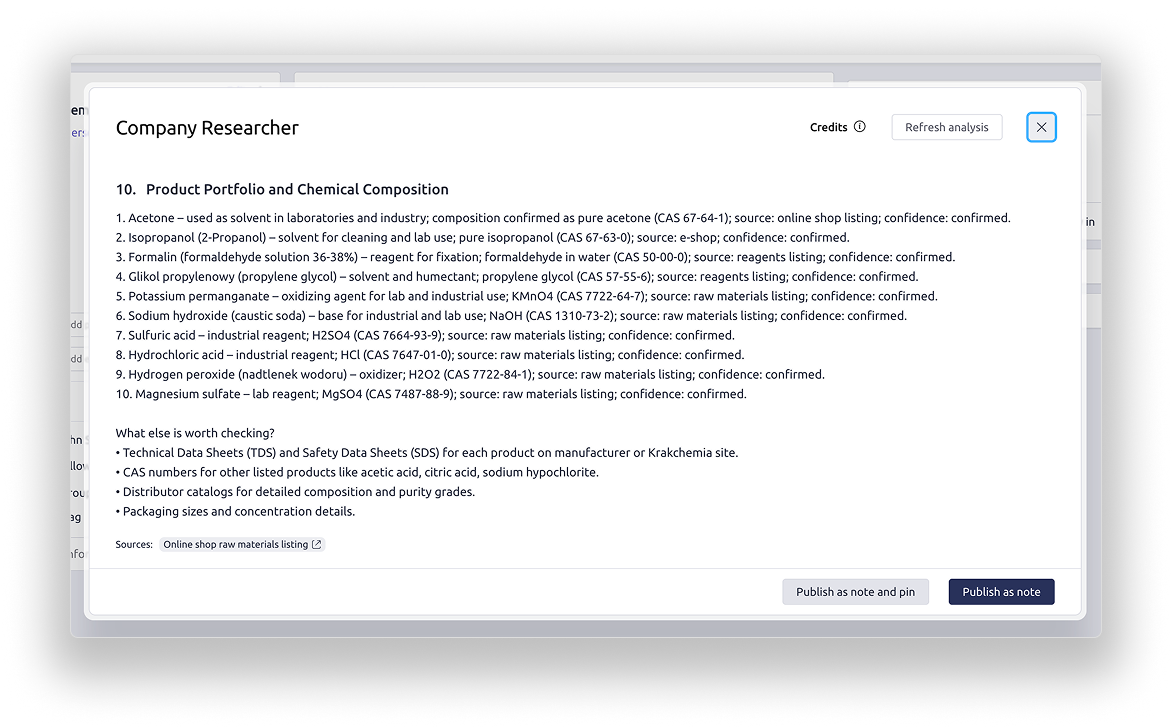
The two instructions we put at the end are also useful for other industries. The ban on guessing composition from the product name cuts off the most common mistake in this type of analysis, and separating manufacturer data from distributor data tells the rep how much they can rely on that number in conversation.
SaaS, tech, and software houses
Section name: Growth Stage and Growth Signals
You are a B2B sales analyst specializing in technology companies. You write briefly, without marketing jargon, and don’t guess.
Context: we sell [product] to [sales / IT] teams at SaaS companies. This section should answer the question of whether now is a good time to reach out.
Gather:
- funding rounds with dates and amounts, if public
- open job postings by department; separately highlight sales and engineering
- publicly known tech stack, especially [category of tools you compete with]
- changes in decision-making positions over the past 12 months
- financial results, if the company publishes them
Rules:
- Include a date and source for each piece of information.
- If something isn’t in the available sources, say so explicitly. Don’t guess.
- Format: list, up to 250 words.
At the end, list as bullet points: What else is worth checking?
In this industry, the buying cycle is driven by growth and funding, so a fresh round or an open sales role is the strongest publicly available signal of a good time to reach out. The tech stack serves a different purpose: it determines whether you’d be a complement to the current solution or a replacement for it, which affects how you run the conversation.
Financial services
Section name: Regulatory Environment and Decision-Making Structure
You are a B2B sales analyst familiar with the financial services sector and its regulatory environment. You write precisely and handle facts carefully.
Context: we sell [product] to companies in the financial sector. This section should show what this company can even buy and who decides on it.
Gather:
- type of business and the customer segment served
- what regulatory oversight the company is subject to and what licenses it holds
- organizational changes over the past 12 months: acquisitions, mergers, changes in management
- decision-makers in operations, IT, and compliance
Rules:
- Include a date and source for each piece of information.
- Don’t draw conclusions about the company’s financial situation based on assumptions.
- If something isn’t in the available sources, say so explicitly.
- Format: list, up to 250 words.
At the end, list as bullet points: What else is worth checking?
Regulations determine what the client can buy and how long the buying process will take, which is why they come first in the section. The requirement to include a date matters more here than in other industries, because information from a year ago can be outdated after a regulatory change. The last rule blocks the model from speculating about the company’s financial health, an area where a mistake is the most costly.
Common mistakes
Prompts that produce weak analyses tend to share the same mistakes. You can fix most of them before you even create your first analysis, without burning your limits on testing.
- Building sections without talking to the team. The Company Researcher is set up by the administrator, but used by the whole team. A rep has no way to tailor the report to their own needs. Before you create the first sections, ask two or three reps what’s missing from the current report. Even a few offhand answers will give you more than an hour spent alone poring over a single section.
- A prompt that’s too general. “Prepare a company profile” hands the model the decision about what matters. Write out the categories yourself, with specific points.
- All the research crammed into one section. Twenty categories in a single prompt will give you vague, generic research. Break it up into sections, where each one covers a single area.
- Too many sections at once. Every selected section appears in every report, so a section tailored to an edge case turns into a string of sentences saying nothing was found. Focus on the most common cases. If you start selling to other types of companies, you can always change your custom sections.
- Duplicating built-in sections. Check first what the sections you’ve already selected cover, or the same information will end up in the report twice.
- Missing industry context. A prompt without information about what you sell and to whom produces research that could potentially fit any company, so it won’t answer your questions.
- No defined format. Without a length limit and an imposed structure, the AI will write an essay the rep won’t read.
- Treating this as a one-time setting. Your process, offering, and ICP change over time. Come back to the Company Researcher settings after a month and check whether the sections still answer the questions that matter now.
Where to start
Don’t try to design the perfect set of sections on the first attempt. Take the most common scenario in your main segment, add one custom section following the role, context, task, format structure, and run the analysis on a few real companies. In five minutes you’ll see what’s missing, fix the prompt, and only then move on to the next section.
The second step is easy to skip. Tell your team to publish analyses as a note on the company wall. Without that, every change to the Company Researcher settings wipes out previous results, and the same work has to be done all over again.
You’ll find a detailed step-by-step configuration guide in our knowledge base: AI Assistant in Livespace. If you’d like help building sections for your own industry, reach out to our support team.

Turn this into results
See Livespace on your own data, or try it yourself — no card, no commitment.